Planning Area
The Planning Area is the spatial representation of the extent to which the Decision applies. It defines the landscape where actions are planned, fire behavior analyses are run, and values are identified.
When developing an appropriate planning area for an incident, it is important to include input from fire managers, agency administrators and resources specialists or other staff. In the absence of local guidance, an FSPro long term probability output can also help inform the creation of a realistic planning area; the outputs can help inform you of where the fire may try to move as well.
Proper sizing of a Planning Area is important to identify the area of potential incident impact. Drawing a large planning area may incorporate more Strategic shapes and Strategic Course of Action shapes from the Spatial Fire Planning Service, but if your Planning Area is too small, you will have to create a new decision each time management actions occur outside of it. No ramifications result from drawing a large Planning Area. If you are currently developing Strategic Assessments outside of your Planning Area, it should be large enough to include those areas.
The Planning Area is tied to features throughout the application, including the Spatial Inventory, Firefighter Safety graphs, and Strategy stepper. Best practice is to finalize the Planning Area and generate a Spatial Inventory prior to starting work on the Strategy stepper as the generation of the Spatial Inventory automatically clips the Spatial Fire Planning information to the Planning Area to allow for assigning objectives, requirements or other strategic categories spatially.
There will always only be two Planning Areas - Initial and Current.
Initial Planning Area
The Initial Planning Area is automatically generated when an incident decision is initiated, using the initial Point of Origin reported by the reporting system of record (through the IRWIN exchange) as the center point of a 7 x 7 mile square (~31,360 acres). If the Point of Origin is "moved" or edited in another system, Initial Planning Area remains centered on the initial reported Point of Origin.
The Initial Planning Area is symbolized by a dashed line and can be turned off in the Layer List in the Incident parent group to remove it from the map view.
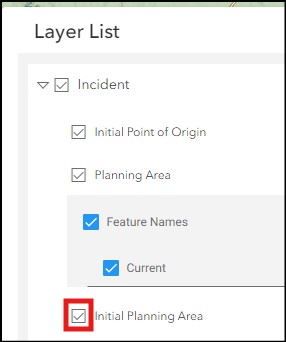
The application will automatically generate a Spatial Inventory based on the Initial Planning Area when the incident decision is started.
User Created Planning Area
Users that are Collaborators on an incident can draw, copy or upload a new Planning Area, which will automatically replace the Initial Planning Area and be named “Current”. Users cannot rename the Planning Area.
Users can utilize reference layers to inform the creation of the Planning Area. For example, users can turn on the Potential Operational Delineation (PODs) layer under the Operational Fire Planning parent directory in the Layer List and copy a specific POD polygon as a Planning Area shape with the Drawing tool. If the desired Planning Area consists of multiple PODS, user can use the reference layer as a guide when drawing the PA shape.
Once a user generates a “new” Current PA, the Current and Initial Planning Areas will have different symbology on the map.
Any time the Current Planning Area is updated, the Spatial Inventory should be generated again – validate the currency of the Spatial Inventory using the date and time generated value in the Spatial Inventory table.